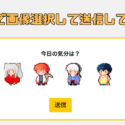
「絵文字をポチッとしてもらう投票フォームを作りたい!」そんな思いつきから始まったこの取り組み。最終的にたどり着いたのが WPForms でした。
WPFormsで唯一残念に思っていたところ「どの絵文字が選ばれたかを後から振り返れない」問題をGASでどうにか解決したので、まとめます。
WPFormsの画像付き投票フォーム
最初の理想像
- 絵文字や画像を使った複数選択肢
- 1日1回だけ投票できる
- 結果はWordPress内で集計できる
- デザインもシンプルで可愛い

最終系
- 絵文字や画像を使った複数選択肢 →できた!調子に乗ってGIFアニメにしてみた!
- 1日1回だけ投票できる →できた!ちょっと難しかったけど!
- 結果はWordPress内で集計できる →できない…
- デザインもシンプルで可愛い →なるべく個人サイトのデザインに合わせた!
唯一の課題:「結果がまとめて見られない」
WPFormsは投票結果を メールで通知するだけ で、ダッシュボードに履歴を残すにはPro版が必要です。
でも、諦めたくない。しかも無料がいい。
Gmail + Google Apps Script でログ管理
私はメインでGmailを使っているので、「とりあえず自動振り分けくらいはするか」と思って久しぶりにやり方を調べてたら、どうやらGoogle Apps Scriptなるものがあるらしい。
ステップ1:Gmailの自動振り分け
選択肢が件名になってメールが届くので(例:「今日の気分:犬夜叉」)それをGmail側で「今日の気分」ラベルに自動振り分け。

- 条件:「件名に うる星 OR らんま OR 犬夜叉 OR RINNE OR MAO OR めぞん OR 人魚 OR ダスト」
- Gmailのフィルタ設定方法
ステップ2:Google Apps Script(GAS)でログ化
- まずGoogle ドライブを開きます。
- [新規] > [その他] > [Google Apps Script] をクリックします。

その1:ラベル付きメールをスプレッドシートに記録するスクリプト
基本的に以下のコードをペーストすれば大丈夫ですが、「/ここに転記したいスプレッドシートのURLを記載/」の部分をご自分のスプレッドシートのURLに変えてください。
function myFunction() {
  const ss = SpreadsheetApp.openByUrl('/ここに転記したいスプレッドシートのURLを記載/');
  const sheet = ss.getSheetByName('今日の気分');
  const query = 'label:"今日の気分" -label:"今日の気分/転記済み"';
  const threads = GmailApp.search(query);
  const label = GmailApp.getUserLabelByName('今日の気分/転記済み');
  threads.forEach(function(thread) {
    const messages = thread.getMessages();
    messages.forEach(function(message) {
      const date = message.getDate();
      const subject = message.getSubject();
      const lastRow = sheet.getLastRow() + 1;
      sheet.getRange(lastRow, 1).setValue(date);
      sheet.getRange(lastRow, 2).setValue(subject);
    });
    thread.addLabel(label);
  });
  const lastRow = sheet.getLastRow();
  if (lastRow > 2) {
    const range = sheet.getRange(2, 1, lastRow - 1, 2); // A2:B
    range.sort({column: 1, ascending: true});
  }
}
コードが書けたら「トリガー」をクリックし、続いて右下部の「+トリガーを追加」をクリック!


その2:月ごとの集計と通知スクリプト
月毎に多かった投票も見たいので、集計のスクリプトも書きました!
function sendPreviousMonthKibunSummary() {
  const label = GmailApp.getUserLabelByName('今日の気分');
  const threads = label.getThreads();
  const keywords = ["うる星", "らんま", "犬夜叉", "RINNE", "MAO", "めぞん", "人魚", "ダスト"];
  const counts = {};
  keywords.forEach(k => counts[k] = 0);
  const now = new Date();
  const year = now.getMonth() === 0 ? now.getFullYear() - 1 : now.getFullYear();
  const month = now.getMonth() === 0 ? 11 : now.getMonth() - 1;
  const start = new Date(year, month, 1);
  const end = new Date(year, month + 1, 0, 23, 59, 59);
  threads.forEach(thread => {
    const messages = thread.getMessages();
    messages.forEach(message => {
      const date = message.getDate();
      if (date >= start && date <= end) {
        const subject = message.getSubject();
        keywords.forEach(keyword => {
          if (subject.includes(keyword)) {
            counts[keyword]++;
          }
        });
      }
    });
  });
  // 件数で降順ソート
  const sortedKeywords = keywords.slice().sort((a, b) => counts[b] - counts[a]);
  // 件名と本文の組み立て
  const subjectText = `今日の気分${year}年${month + 1}月集計`;
  let body = `【${year}年${month + 1}月の集計結果】\n\n`;
  sortedKeywords.forEach(k => {
    body += `${k}:${counts[k]}回\n`;
  });
  // メール送信
  const email = Session.getActiveUser().getEmail();
  GmailApp.sendEmail(email, subjectText, body);
}


まとめ
最初はなんとなくwaveboxみたいなかわいいものをるーみっくで作りたいな〜と思っただけでしたが、Google Apps Scriptを知れてよかったです。
すべてをWordPress内で完結できませんでしたが、WordPress + Googleの力でやりたいことができてよかったです。